

(Posted by Harsh)Well... Hello friends to this post.... this is UPDATE #1this update has wartune black screen problem.. I have posted it previous post but deleted it .. now i…
Wartune Crack/Fixes/Patches UPDATE #2
(Posted by Harsh)





Hello friends and Welcome to UPDATE #2….

This update shows you wartune Lagging Problem… 🙂
AND here your solution goes..
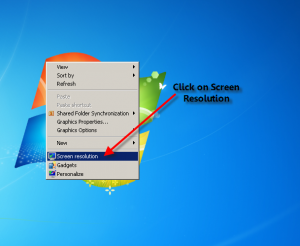
First of all right click on desktop. Then click on screen resolution.
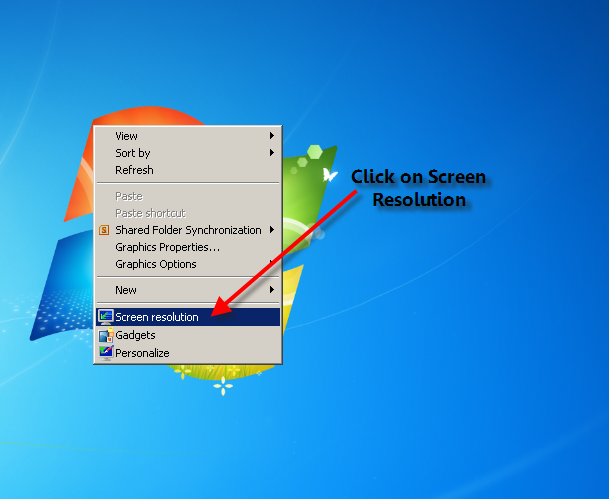
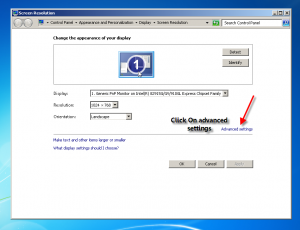
Then Click advanced settings.

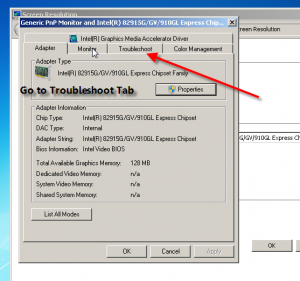
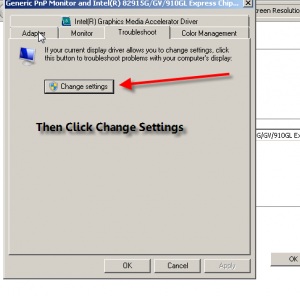
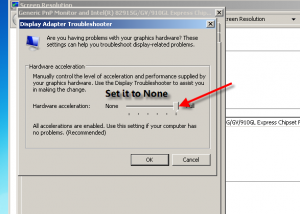
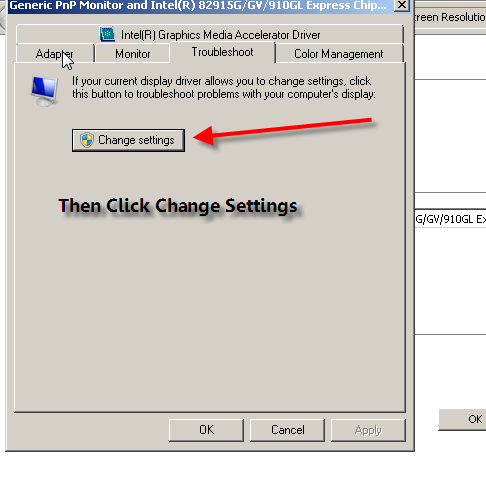
After that go to troubleshoot bar and click on change settings

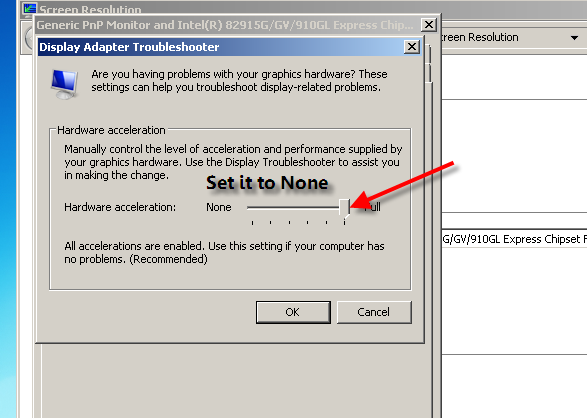
Then set the hard ware acceleration to none.
Guyz if the change settings is not appearing/grayed then wait for next UPDATE.
That’s all . Now run wartune without lag.. 😀
NOTE: This may delay some speed of wartune loading and do this after the wartune loads.
Matched Links from DolyGames Sites / Google
NOTE:
Thanks to Patrons supporting COSMOS Wartune blog & DolyGames gaming portal & the games that I create for people to play for free.Please consider supporting via Patreon.
[mailpoet_form id="2"]Related Posts




One Comment
Leave a Comment
Search for what you need:
Please Support


Phishing Warning
Recent Posts


Recent from Analysis & Tables

 Reference for Daily PRIORITIES for Busy Wartune Players
 Pennants Analysis | Red Pennants (Mythic) in WartuneFrom Categorie(s): Analysis & Tables, Artifact Relic, Dragonchant, Featured, Main Hero Related, Resonance & Pennants, Wartune Guides, Tips & Strategy
 Q&A: Various Wartune Q&A: Best Sylph? Why I lose? & More
 TABLES & Upgrading Goddess AccessoriesFrom Categorie(s): Analysis & Tables, Goddesses
 TABLES / CHARTS: Cuties’ Stats / Attributes & Rankings | Wartune Patch 8.6
![[Patron Exclusive] My BEST Dragonchant Skills Selection (2)](https://wartune.dolygames.com/wp-content/uploads/2019/07/Patron-Exclusive-My-BEST-Dragonchant-Skills-Selection-2-248x162.jpg) [Patron Exclusive] My BEST Dragonchant Skills Selection
[Patron Exclusive] My BEST Dragonchant Skills Selection Multiple Damage vs 1-Shot Damage DiscussionFrom Categorie(s): Analysis & Tables, Discussions and Q&A, Featured, Wartune Guides, Tips & Strategy
this all sounds good, but I’m running Windows 10. Do you have a fix for me?